 The ikie team
ikie's day view shows one day. To move an 11 pm meeting to 1 am the next day, you used to open the sheet and pick a new date and time. You were holding the block with your finger, but you couldn't finish the job with your finger.
So we made it possible to hold a block, push against the end of the day, and land in the neighbouring day. That is one sentence. Getting it to feel right took seventeen PRs over a week. Half of them fixed bugs where the block vanished or the app froze at the moment of crossing. The other half tuned what crossing should feel like.
First version: hold at the edge, then pop
The first version (#439) worked like this. When you lift a block, the timeline shows 23:00–24:00 of the previous day above and 00:00–01:00 of the next day below, as dashed, faded strips. The block can sit across them. Push further against that end and the block squashes, the neighbouring day's edge fills up, a CoreHaptics continuous hum plays, and after 0.6 s it pops into that day.
The same PR fixed events that cross midnight. The board hands out times clipped to the day, so moving a 23:00–01:00 event shrank it to one hour. Moves now use the event's real time.
The next bug was reading that time (#443). The real time 2026-10-15T05:00:00Z was read as the person's wall clock with the trailing Z dropped, so in Seoul the block flew nine hours up, off the screen. Demo data used times without a zone, so the simulator never showed it. After that we let you keep dragging after the pop without lifting your finger (#449). The move is saved once on release, and undo goes back to where the block was before it crossed.
The held block needed one owner
Four days later, a real 23:25–01:25 event was dragged back and forth across days on a real account. The block disappeared, the timeline stopped taking any touch, and the app froze and crashed.
The held block's state lived in the day column that was pressed (a SwiftUI view's @State). When the day changed, that column was rebuilt or went away. On top of that, the board places an event on the day it starts, and a block across midnight still starts on the previous day, so it wasn't on the new day's board. No column drew the block, and only the "holding" state was left, blocking touches.
#893 gave it one owner. The held block lives in one screen state box (BoardUI.lift), and on the new day we draw the moved block rather than look for it on the board. Releasing goes through one path (releaseLift), whether the gesture ends or is cancelled.
We wrote the test before the fix. CarryFlipTests lifts a two-hour block, parks it on the bottom edge strip, and lets days roll over. A debug probe counts moments when something is held but no held block has been drawn for more than 0.3 s (orphan). On main, one of two runs froze and the other ended with orphan 1. After the fix both runs passed, crossing 16 and 27 days in a row without the block ever vanishing.
State that changes during a gesture has one owner. Keep it somewhere that survives views being rebuilt, and route every way of ending through one path.
The next three days added one yardstick at a time to the same test: whether the block stays under the finger after crossing (slip), where the new day's board starts, and whether the block keeps following a moving finger.
In #903 the scroll correction after a crossing was computed in several places, so just resting on the edge strip crossed five or six days in a row. We moved it into one place at the moment of crossing (BoardScreen.carried), and after a crossing the edge strip doesn't push again until the finger leaves it and comes back (edgeHold). #915 was "switch the day" and "scroll so the block stays under the finger" happening in two separate view updates. If the second one ran 42 ms (two or three frames) late, the block was drawn once at the old scroll position and jumped 430 pt. The probe itself first sampled only once per frame, so it caught this in just two of six runs. Once it also measured every time the block reported where it drew, it caught it every time.
#920 was a TestFlight bug: after crossing a day, the block didn't move at all. The long-press drag holds on to the day of the column that was pressed until it ends. After crossing, that column was no longer the held day, so every finger move was thrown away. Moves now go to the lift in the state box, the same way release does.
From time to distance
With the bugs pinned, it was time to work on the feel. We wanted three things: a pop that connects into the next day's grid, a sense of pressure, and a crossing that feels like punching through something.
Crossing by time leaves the hand nothing to do. You press and wait. #923 switched to distance. Past the wall (the end of the neighbouring day's hour), the block lags behind the finger like a rubber band, and pushing a set distance makes it cross. Pull back before that and the band springs back. We didn't invent the band. We borrowed the same shape UIScrollView uses for its edge bounce.
/// Rubber band (same shape as UIScrollView's edge bounce, x·c·d / (d + c·x)): follows the finger at
/// `resistance` at first, then gets heavier near `band` and never passes it
static let band: CGFloat = 46
static let resistance: CGFloat = 0.85
static func rubber(_ x: CGFloat) -> CGFloat { x <= 0 ? 0 : x * resistance * band / (band + resistance * x) }
The new day's board doesn't swap in place either. It starts where that day appeared to continue just before the crossing (the old day's 24:00 line) and slides into position. The probe measured that mismatch (seam) at 211–294 pt before, and 0 after.
The first values (c 0.55, d 120 pt, crossing at 90 pt) felt far too weak in use, and the pop wasn't satisfying. The band slowed down evenly all the way, so there was nothing to push against. In #929, c 0.85 and d 46 make the block follow the finger almost exactly at first, then turn heavy quickly. The crossing distance went from 90 to 110 pt in the same PR, and when 110 still crossed too fast, it went to 150 pt in #930.
Show as table
| Pushed past the wall | First (0.55 · 120) | Now (0.85 · 46) |
|---|---|---|
| 0pt | 0pt | 0pt |
| 20pt | 10.1pt | 12.4pt |
| 40pt | 18.6pt | 19.6pt |
| 60pt | 25.9pt | 24.2pt |
| 80pt | 32.2pt | 27.4pt |
| 100pt | 37.7pt | 29.8pt |
| 120pt | 42.6pt | 31.7pt |
| 140pt | 46.9pt | 33.2pt |
| 160pt | 50.8pt | 34.4pt |
Tighten, then release all at once
A rubber band alone wasn't enough pressure. In #929 we tied several senses to the push depth (0–1).
| Depth | Hand | Eye |
|---|---|---|
| 0 → 1 | The hum gets stronger and sharper (intensity 0.3 → 1) | The neighbouring day's edge fills up |
| Every 1/8 | A ratchet tick, harder the deeper | |
| From 0.5 | The block trembles | |
| From 0.9 | The hum cuts out (a held breath) | |
| 1 (pop) | Two taps and a small aftershock | The block swells to 1.09× and settles |
Cutting the hum just before the crossing mattered more than we expected. The tightening vibration needs a short silence for the taps after it to read as a release.
At first the block itself stretched with depth². The front half barely changed, then it shot out and snapped across, and the whole block got long the moment it entered the overflow strip. It should look as if space-time were bending. So #930 bent space, not the block. The overflow past the day's end is one bent region, and a time u past the day's end is drawn here:
/// Where time u (pt) past the day's end is drawn in the overflow strip (same formula as Wormhole.metal)
static func warped(_ u: CGFloat, region: CGFloat, bend: CGFloat) -> CGFloat {
    guard u > 0, region > 0 else { return u }
    let r = u / region
    return u + bend * region * r * r * r / 3
}
g(u) = u + bend·R·(u/R)³/3 has g′(0) = 1. There's no kink at the day's end, and it stretches more toward the wall. The overflowing part of the held block, the neighbouring day's lines, labels and blocks all get the same bend, so it looks like bent space rather than a stretched block. The bend is 0.8 while resting there, plus 1.4 times the depth while pushing. A SwiftUI Metal shader (distortionEffect) draws it, and the same formula lives in Swift to size the overflow strip.
You should feel the hum even when you shove
Distance brought a new problem. Drag the edge strip hard and 150 pt fills in an instant, so it crossed with a thunk before you could even feel the hum. We measured 45 ms from starting to push to crossing.
#933 added a separate charge (DayCharge). It follows the push depth, but rises at most 1/0.45 per second, and drops immediately when you back off. The bend, tremble, ratchet, glow and pop all read the charge. Pushing slowly feels the same as before, and pushing hard still takes 0.45 s to fill before it crosses.
Show as table
| Since the push started | Push depth | Charge |
|---|---|---|
| 0ms | 0% | 0% |
| 50ms | 100% | 11% |
| 100ms | 100% | 22% |
| 150ms | 100% | 33% |
| 200ms | 100% | 44% |
| 250ms | 100% | 56% |
| 300ms | 100% | 67% |
| 350ms | 100% | 78% |
| 400ms | 100% | 89% |
| 450ms | 100% | 100% |
| 500ms | 100% | 100% |
One feedback loop froze the app
The same morning, the app on a real phone froze and was killed by the system watchdog (0x8BADF00D). That is the code iOS uses when the main thread stops responding for about ten seconds.
When the overflow above midnight grew or shrank by five minutes, we scrolled by the same amount so the screen stayed put, and subtracted that from the drag distance. But the drag distance was read back from the scroll position. A tiny floating-point remainder between the scroll we applied and the value we subtracted flipped the block's minute between -100 and -95 at a five-minute boundary. That changed the overflow again, which scrolled again. It looped about forty times a second, forever.
#932 cut the loop. The drag distance now records only what the edge strip actually scrolled and is never read back from the scroll position. The calculation that decides the block's minute no longer takes the overflow as input. A test that shoves a block starting at 23:55 hard upward from the top froze on main and passes after the fix.
Never read a value the screen corrected back in as input. If the only input is what the finger did, a feedback loop can't form.
Colour that follows the bend
The last three PRs were about colour. The overflow glow was painted linearly over the screen height and the block's tint linearly over the block's length. Space bent but the colour didn't follow, and it started abruptly at 0.15 at the day's end, looking broken halfway. #939 paints colour by how much each spot is stretched, w = bend·r²/most. It's 0 at the day's end, deepens toward the wall, and blends in the current colour by push depth. WarpTintTests checks that it tints every pixel from the day's end to the wall without a break.
After that, the purple membrane line drawn at the wall was just decoration. So #945 removed it. Pressure now shows only through the colour of the bent space.
Next we wanted the colour to feel more like crossing dimensions. Of a few mock-ups, the pick was a spectrum with a little refraction (#954). The stretch w stays the same, and that spot is painted violet, indigo, teal and mint. The spectrum turns toward teal with push depth and shimmers slightly over time (it stops with Reduce Motion). Only near the wall, red and blue are read a few points apart so the light looks bent. The four colours were added as design tokens, tuned separately for light and dark.
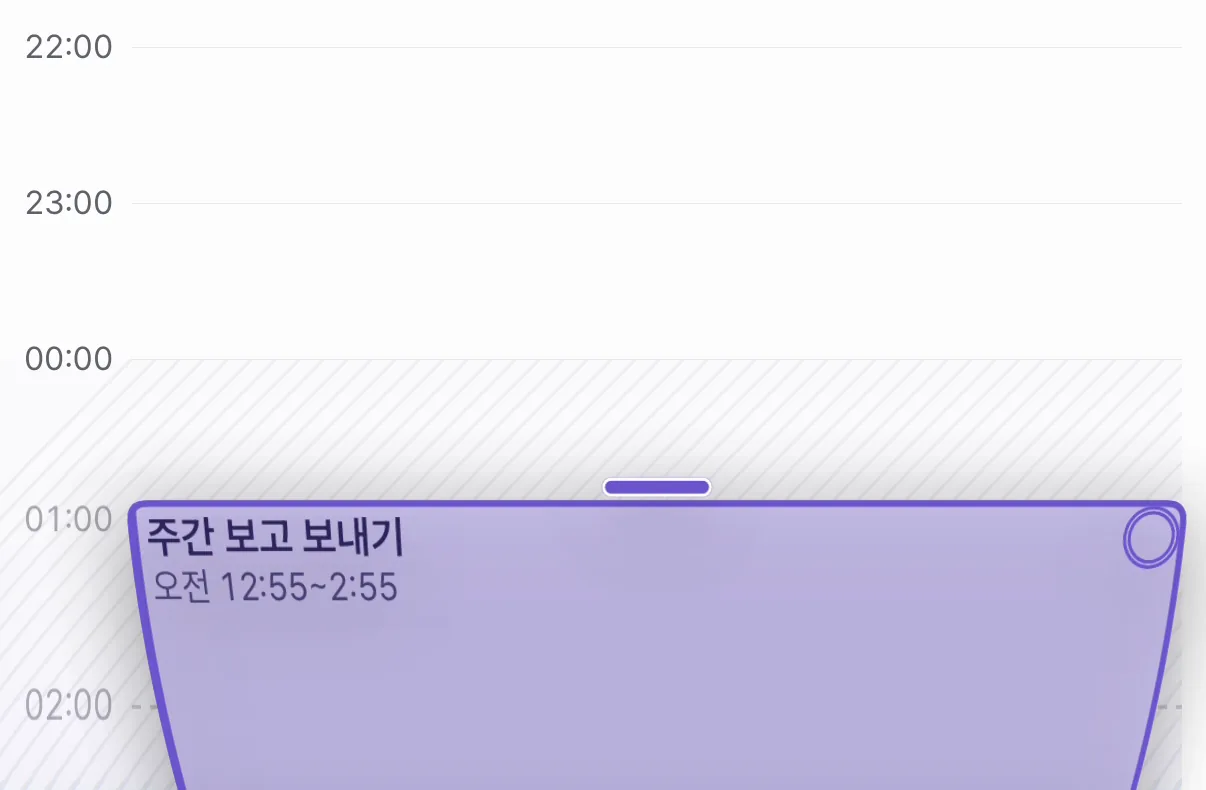 Depth 0
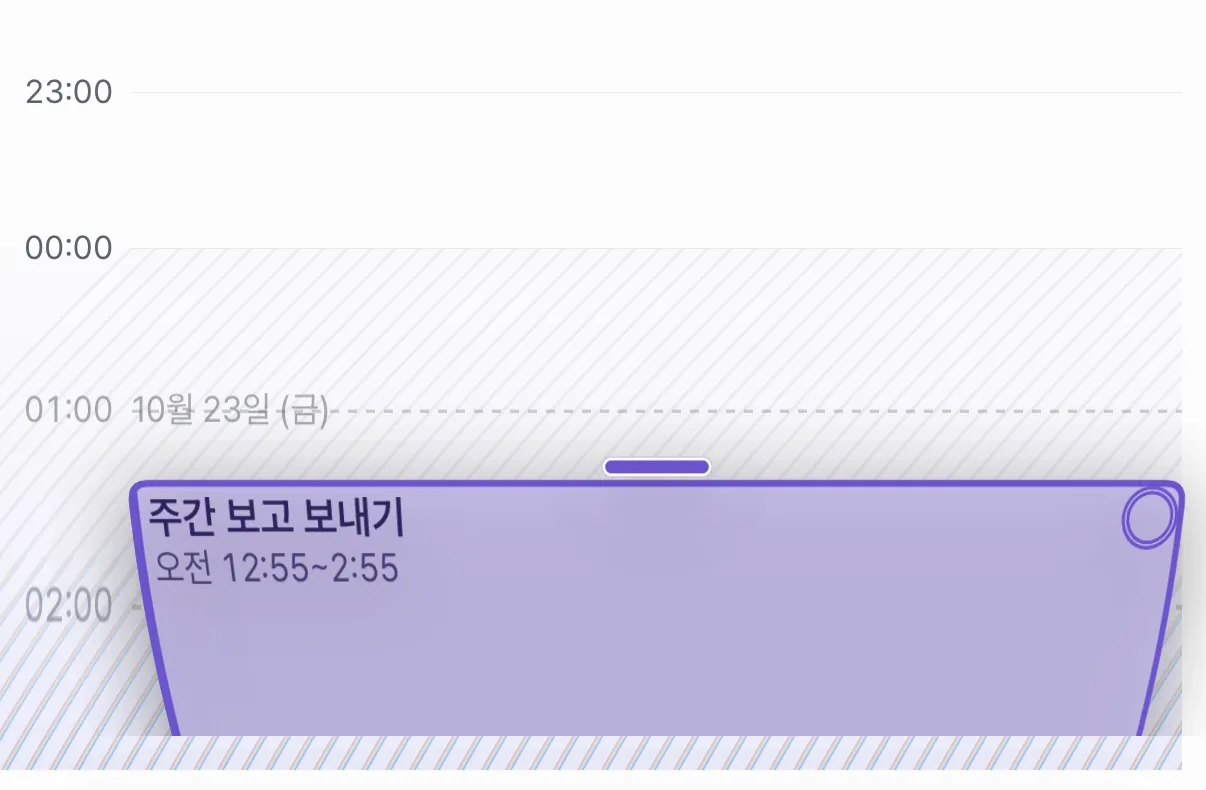 Depth about 0.5
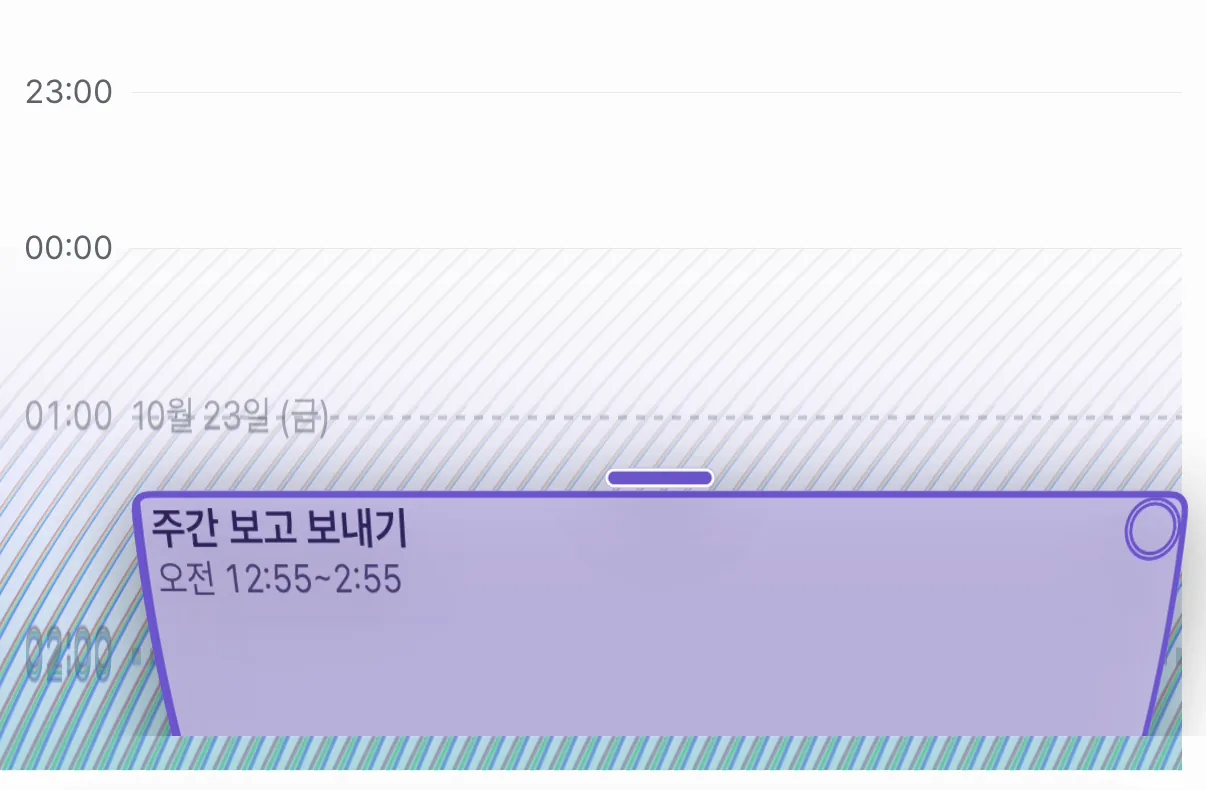 Depth about 0.9
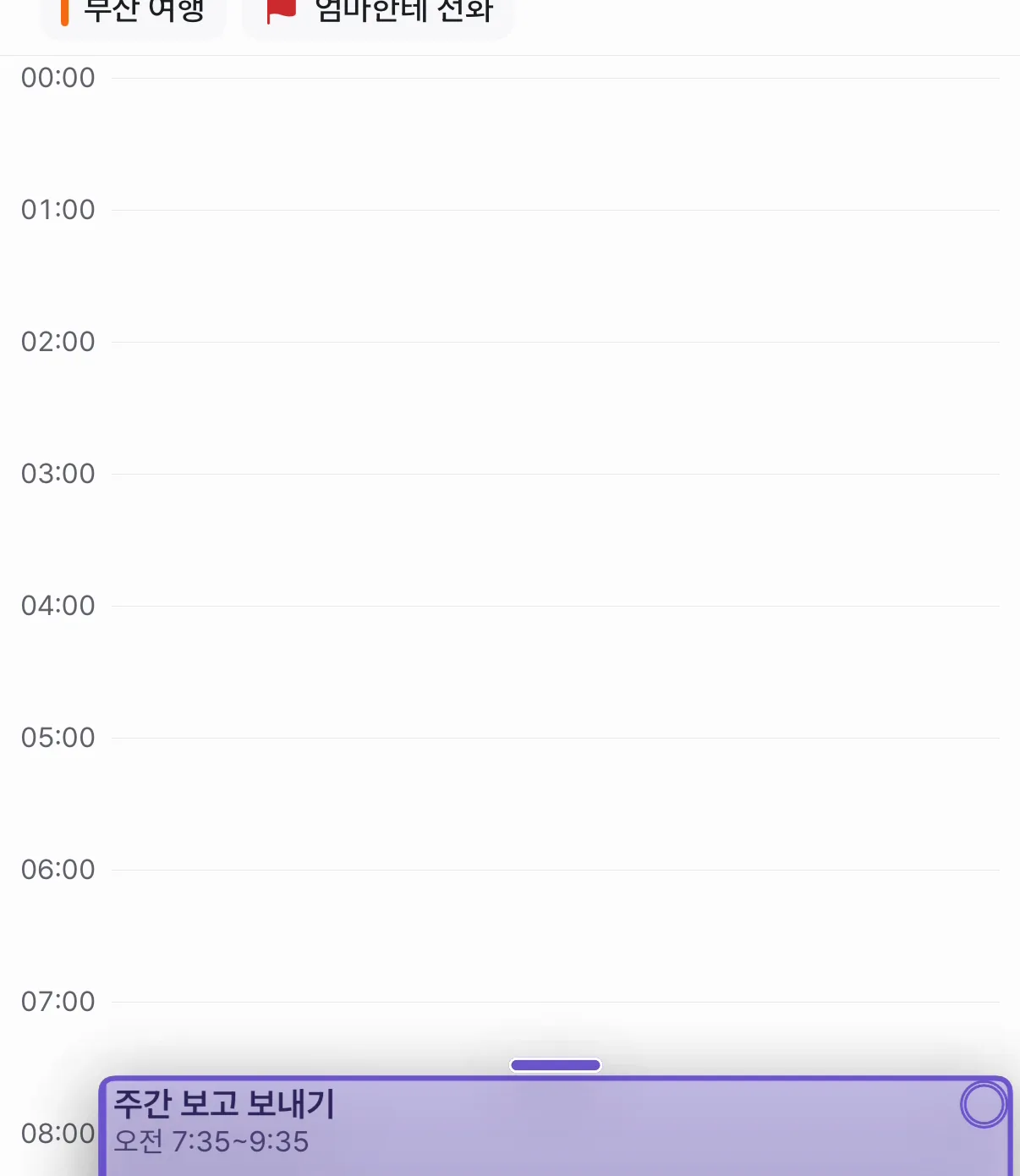 After crossing
The numbers in one place
All the numbers behind this feel live in DayFlip, each with a comment saying why it has that value.
| Name | Value | Meaning |
|---|---|---|
| pop | 150pt | Push this far past the wall to cross (was 90, then 110) |
| fill | 0.45 s | The shortest time for the charge to fill |
| band · resistance | 46pt · 0.85 | The rubber band |
| teeth | 8 | Ratchet steps |
| tremble · hush | 0.5 · 0.9 | Depth where trembling starts and the hum cuts out |
| bend · bendPush | 0.8 · 1.4 | Bend while resting, extra bend while pushing |
| kick · spring | 90pt · 0.36s/0.58 | How far the new day slides in, and its spring |
The web doesn't have this. Web dragging uses FullCalendar, which treats a drop outside the timeline as a cancel and has no room to draw outside it, so the block goes back. Why the two apps differ is written down in the surface list (surfaces.ts).
- #439Hold 0.6 s, then pop (crossing by time)
- #443–458Time zone read, keep dragging after crossing, stay in view
- #893–920One owner for the held block, under the finger, keeps following
- #923Crossing by distance, rubber band, the next day slides in
- #929–930Tightening pressure, releasing pop, bent space
- #932–933Break the feedback loop, a charge that fills
- #939–954Colour that follows the bend, membrane line removed, a dimension-crossing spectrum
What's left
So far the numbers were tuned by one person's hand. Whether 150 pt is far or near, or 0.45 s long or short, for other hands will take more people using it.
What we learned
Feel arrives as words like "stronger" or "tighter". Turning those straight into numbers never ends. The order that helped here was: first pin the bugs with tests so the block never vanishes, then turn the feel into one formula (the band, the bend, the charge), then change only that formula's numbers and try again. Because there was one formula, "the pressure is too weak" became changing two values.